Command Reference
Complete reference for the CCA CLI. The binary is cca.
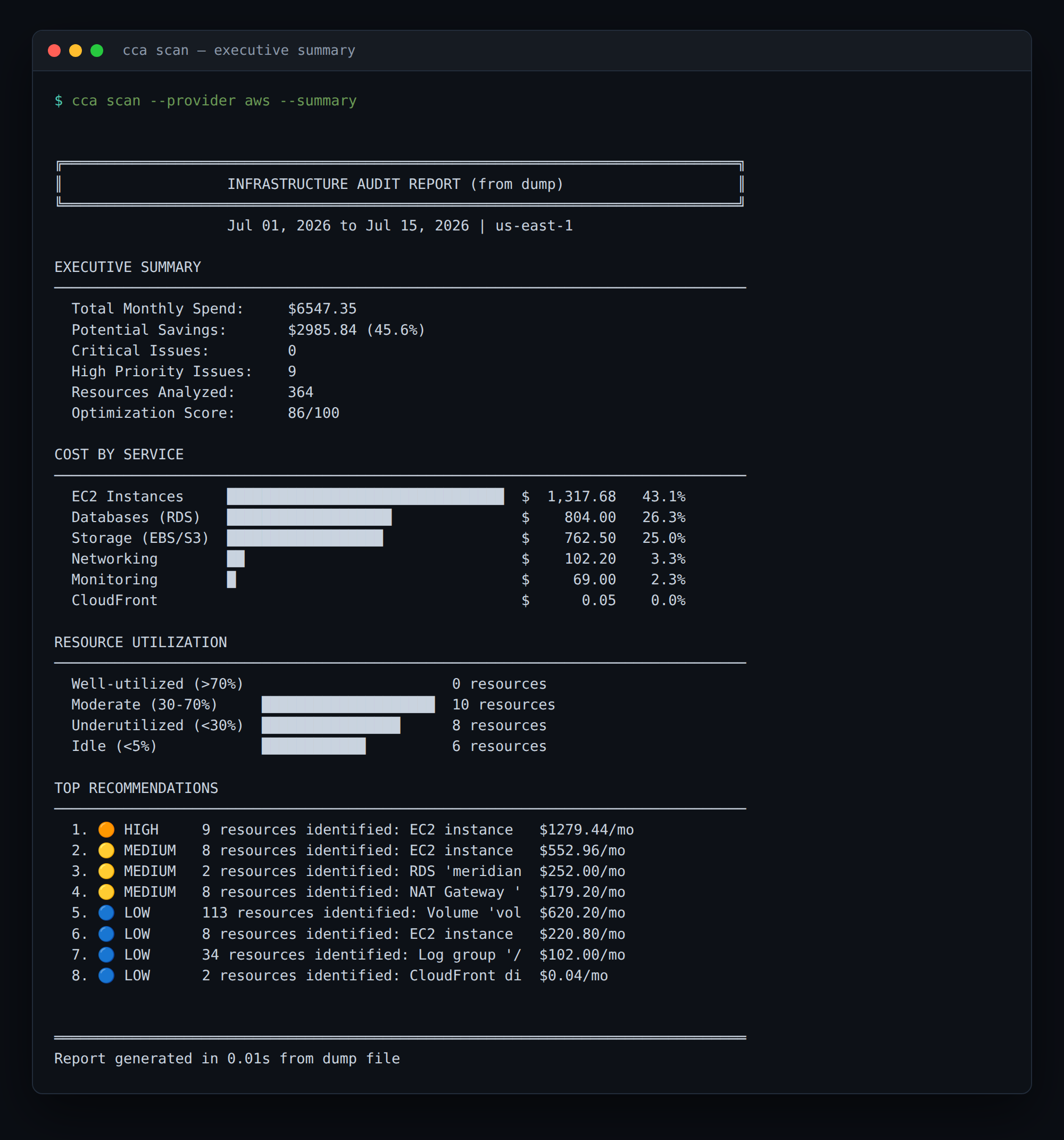
Resource IDs are redacted in the example images on this page.
Global Options
These options apply to every command (they may appear before or after the subcommand):
| Option | Short | Default | Description |
|---|---|---|---|
--help | -h | Show help information | |
--version | -V | Show version number | |
--verbose | -v | off | Enable console logging (logs are silent by default) |
--log-level | info | Log level: error, warn, info, debug, trace | |
--log-format | compact | Log format: json, pretty, compact | |
--log-file | Write logs to a file (enables logging regardless of --verbose) | ||
--mode | managed | Execution mode: managed, local (local requires an air-gapped build). Env: CCA_MODE | |
--api-key | API key for managed mode. Env: CCA_API_KEY | ||
--license-file | Path to a license file. Env: CCA_LICENSE_FILE | ||
--license-key | Base64-encoded license key. Env: CCA_LICENSE | ||
--bundle-path | Path to a signed rule bundle (air-gapped). Env: CCA_BUNDLE_PATH |
For managed mode you can avoid passing --api-key on every run — see login.
Commands
scan
Scan cloud resources for cost optimization opportunities.
cca scan [OPTIONS]
Options
| Option | Short | Default | Description |
|---|---|---|---|
--provider | -p | aws | Cloud provider: aws, azure |
--regions | -r | us-east-1 | Comma-separated regions, e.g. us-east-1,us-west-2 |
--services | -s | all | Comma-separated service categories: compute, storage, database, networking, serverless, analytics, containers, ai, security, monitoring, cdn, other |
--days | -d | 7 | Days of metrics to analyze |
--output | -o | table | Output format: table, json, yaml, markdown, csv, sarif, pdf |
--output-file | -f | stdout | Write output to a file |
--group-by-tags | Group findings by tag key for cost allocation (e.g. Team) | ||
--min-cost | Only include findings above this monthly USD amount | ||
--include-hygiene | false | Include $0-savings hygiene findings (hidden by default; High/Critical findings are always shown) | |
--all | false | Show all findings (default: top 10) | |
--top | Maximum number of findings to display | ||
--no-recommendations | false | Hide recommendations in output | |
--dump | Dump all raw data (resources, metrics, costs, findings) to a JSON file | ||
--summary | false | Summary only (default: detailed report with remediation) | |
--skip-costs | false | Skip cost collection (useful for cloud emulator testing) |
Global options (--mode, --api-key, …) also apply.
Examples
# Basic AWS scan (managed mode is the default)
cca scan --provider aws

# Scan specific regions
cca scan --provider aws --regions us-east-1,us-west-2

# Output as JSON to a file
cca scan --provider aws --output json --output-file results.json

# Show all findings, not just the top 10
cca scan --provider aws --all

# Filter resources by tag

# Only findings worth more than $50/mo
cca scan --provider aws --min-cost 50

# Azure scan
cca scan --provider azure

# Debug logging
cca scan --provider aws --log-level debug
Output Formats
- table (default) — human-readable console output.
- json — structured JSON for programmatic use.
- yaml — YAML equivalent of the JSON output.
- markdown — a Markdown report (handy for PRs / wikis).
- csv: one row per finding, for spreadsheets and FinOps workflows.
- sarif: SARIF 2.1.0, for CI code scanning (GitHub, GitLab). Upload with
github/codeql-action/upload-sarif. - pdf — a standalone PDF report.
Machine-readable formats (json, yaml, markdown, csv, sarif) print no progress noise, so they pipe cleanly.
Example output
The default table output leads with the executive summary above, then lists findings by severity — each with the evidence behind it and a remediation step:
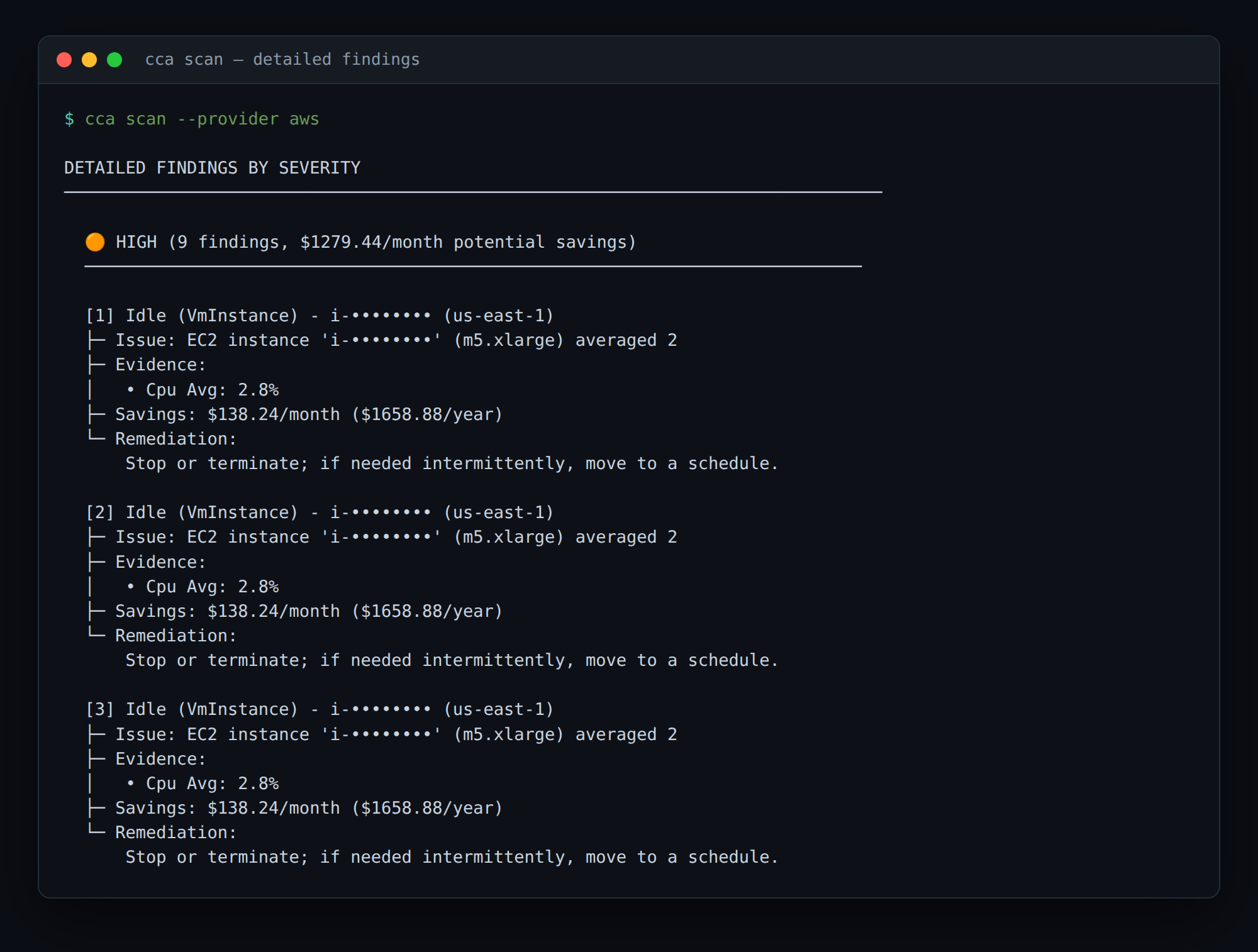
audit
Generate a comprehensive infrastructure cost audit, with optional cost-allocation grouping, tag-compliance checks, and trend comparison against a previous run.
cca audit [OPTIONS]
Options
| Option | Short | Default | Description |
|---|---|---|---|
--provider | -p | aws | Cloud provider: aws, azure |
--regions | -r | us-east-1 | Comma-separated regions |
--services | -s | all | Comma-separated service categories (see scan) |
--days | -d | 7 | Days of metrics to analyze |
--output | -o | table | Output format: table, json, yaml, markdown, csv, sarif, pdf |
--output-file | -f | stdout | Write output to a file |
--group-by-tags | Group costs by these tag keys (comma-separated) | ||
--compare | Compare to a previous audit JSON for trend analysis | ||
--cost-threshold | Minimum cost (USD) to include in the breakdown | ||
--tag-policy | Path to a tag policy file (YAML/JSON) for compliance validation | ||
--required-tags | Required tag keys (comma-separated) — simpler alternative to --tag-policy | ||
--skip-tag-compliance | false | Skip tag compliance validation | |
--all | false | Show all findings (default: top 10) | |
--top | Maximum number of recommendations to display | ||
--dump | Dump all raw data to a JSON file | ||
--summary | false | Summary only | |
--skip-costs | false | Skip cost collection |
Examples
# Full audit grouped by team tag
cca audit --provider aws --group-by-tags team,environment

# Trend vs a previous run
cca audit --provider aws --output json --output-file this-week.json
cca audit --provider aws --compare this-week.json

# Enforce required tags
cca audit --provider aws --required-tags owner,cost-center
report
Generate reports from a saved data dump (produced by scan/audit --dump). No cloud access required.
cca report <DUMP_FILE> [OPTIONS]
Options
| Option | Short | Default | Description |
|---|---|---|---|
<DUMP_FILE> | required | Path to the data dump JSON file (positional) | |
--output | -o | table | Output format: table, json, yaml, markdown, csv, sarif, pdf |
--output-file | -f | stdout | Write output to a file |
--group-by-tags | Group costs by these tag keys (comma-separated) | ||
--compare | Compare to a previous audit JSON for trend analysis | ||
--cost-threshold | Minimum cost (USD) to include in the breakdown | ||
--severity | all | Filter by severity: critical, high, medium, low (comma-separated) | |
--regions | all | Filter by region (comma-separated) | |
--services | all | Filter by service (comma-separated) | |
--all | false | Show all findings (default: top 10) | |
--top | Maximum number of recommendations to display | ||
--summary | false | Summary only |
Examples
# Re-render a saved dump as Markdown, high severity only
cca report dump.json --severity critical,high --output markdown
setup
Set up cloud provider access — generate or deploy a least-privilege read-only IAM role via CloudFormation.
cca setup [OPTIONS]
Options
| Option | Short | Default | Description |
|---|---|---|---|
--provider | -p | aws | Cloud provider: aws, azure |
--deploy | false | Deploy the CloudFormation stack (create the IAM role) | |
--output-template | false | Print the CloudFormation template | |
--stack-name | cloud-cost-analyzer-access | CloudFormation stack name | |
--role-name | CloudCostAnalyzerRole | IAM role name to create | |
--create-user | false | Also create an IAM user with access keys | |
--user-name | cloud-cost-analyzer | IAM user name (with --create-user) | |
--external-id | External ID for cross-account role assumption | ||
--trusted-account-id | Trusted AWS account ID (cross-account access) | ||
--output-file | -f | Write the template to a file | |
--region | -r | us-east-1 | AWS region for the deployment |
Examples
# Print the CloudFormation template
cca setup --provider aws --output-template

# Deploy the read-only role
cca setup --provider aws --deploy
doctor
Run preflight diagnostics — checks credentials, IAM permissions, and connectivity, and prints a clear pass/warn/fail report. Run this first when a scan fails or isn't reaching the dashboard.
cca doctor [OPTIONS]
Options
| Option | Short | Default | Description |
|---|---|---|---|
--provider | -p | aws | Cloud provider to diagnose: aws, azure |
--json | false | Emit results as JSON (for CI / machine parsing) |
doctor also reads the global --mode, --api-key / CCA_API_KEY, and stored credentials, so it validates the exact managed-mode setup a scan will use. It exits non-zero on hard failures, so it can gate automation.
Examples
# Diagnose the default AWS setup
cca doctor --provider aws

# Machine-readable output for CI
cca doctor --provider aws --json
login
Store your API key locally so scans don't need --api-key (or CCA_API_KEY) on every run. The key is saved to ~/.cloud-cost-analyzer/credentials.json with owner-only (0600) permissions and used as a fallback when no key is passed.
# Save the key already in your environment or passed via --api-key
CCA_API_KEY=cca_live_xxxxx cca login

# Or run it with no key set and paste it when prompted
cca login
Resolution precedence: --api-key flag > CCA_API_KEY env > stored credentials file.
logout
Remove the locally stored API key.
cca logout
license
Manage the air-gapped license.
cca license <SUBCOMMAND>
| Subcommand | Description |
|---|---|
fetch <CODE> | Redeem an activation code and save the license locally |
show | Show the current license status |
path | Print the resolved license file path |
refresh-crl | Refresh the revocation-list cache for the current license |
# Redeem an activation code from the dashboard
cca license fetch ABCD-1234

# Check status
cca license show
upgrade
Print how to start a paid subscription or free trial to unlock all findings.
cca upgrade
version
Show version information.
cca version
Output:
cloud-cost-analyzer 0.1.1
Environment Variables
The CLI reads these directly (see Environment Variables for the full list, including AWS/Azure credentials):
| Variable | Maps to |
|---|---|
CCA_API_KEY | --api-key |
CCA_MODE | --mode |
CCA_LICENSE | --license-key |
CCA_LICENSE_FILE | --license-file |
CCA_BUNDLE_PATH | --bundle-path |
Exit Codes
| Code | Meaning |
|---|---|
0 | Success |
| non-zero | An error occurred (invalid arguments, auth/permission failure, network error, or a hard doctor failure). Use --log-level debug for details. |
Next Steps
- Environment Variables — configure via env
- Configuration — flags, env, and stored credentials
- AWS Provider — AWS-specific options
- Azure Provider — Azure-specific options